.png?width=400&height=120&name=HarrierLogoNew25_400x120_transback%20(1).png "harrierLLC_logo")

A gentle learning guide to understanding and fixing Single Sign On (SSO) challenges for nonprofit associations.
Hi, I'm Lexie. I have this dream...
All art by Isabelle Francis Bongue on behalf of Harrier.
Why this matters for nonprofits
If you run or work in a small or medium-sized nonprofit or association, chances are you hear versions of this every week:
- “I can log into the website, but not the learning portal.”
- “The community forum says my password is wrong.”
- “I reset my password… again… and it still didn’t work.”
Behind those frustrations often lives a very boring technical idea called Single Sign On, or “SSO”. When it works, members barely notice it. When it breaks, support tickets multiply like rabbits!
To understand SSO without drowning in acronyms, let’s follow Lexie as she dreams about SSO at the nonprofit she works for in Oregon. She works in membership services for the Oregon Student Art Association (OSAA), loves walking her dog, and enjoys coffee while she helps members. Her days are filled with login emails, password resets, and calm reassurances. Sometimes, it’s exhausting.
After one extra long day, she curls up on the couch, drifts slowly off to sleep…
Lexie's dream

Break time! Lexie jumps up and decides its time to take Lizzard (her best friend!) out for a walk. As they stroll, she is replaying the same thoughts in her head:
“Why can this member get into their portal, but not the Learning Management System? Why can’t our Board Chair log in to anything right now? I wish I understood more about how our system works!”
She gets back, takes a big breath, and sits at her computer. Before she can get crackin' again, the screen ripples like water. She’s being pulled in…
Welcome to SSO land

Lexie lands in a swirling digital world where doors float midair and sign-in pages drift like clouds.
A small owl wearing spectacles flutters down.
“Greetings, Lexie. I am the AuthOwl. Our world is breaking. Lord Logout has shattered our connections. We need your help to fix it!”

Lexie looks around. Every door has a different logo. Every door needs some sort of key…she is so confused!
Then, AuthOwl speaks again;
"Access is built on trust. In SSO land, one system 'vouches' for your identity to grant you access. It works like a skeleton key; one key for many doors!"
A basket of keys materializes in front of her! Lexie finds a key with her name on it , and a long code of numbers on it. Above the code, it says ‘UserID’.

The big idea, in plain language
“Duh” she says to herself. She understands this part already! Single Sign On means one trusted identity can unlock multiple related systems. In her case, it's the association's custom-built database that they have had for 10+ years. It's supposed to do just that. But it's pretty messy, and there are a lot of duplicates and old records.
She knows they need to create a method where:
- There is one central identity system that knows who you are.
- Other systems trust that identity system.
- Once a member is verified, they shouldn't have to re-prove themselves at every door!
Lexie nods to her own thoughts. This already sounds like what her members expect. She needs like a magic wand or staff or something. She starts to walk.

The Handshake door
Lexie reaches a massive door labeled Access Granted, with a handshake icon on it. It doesn’t budge.
The AuthOwl reappears:
“SSO is built on trust. One system must vouch for you to another. This is what we call the Handshake.”
In SSO terms, the “handshake” is not a screen or a button. It’s the behind-the-scenes exchange where systems agree:
- “Yes, this is Lexie.”
- “Yes, she already proved it.”
- “Yes, I trust the system that verified her.”
“Ok, so it's about building a consistent SSO that works the same way with different systems! We need good data management and a methodology that is built with purpose, not just patched together by different vendors.” Lexie says.
As Lexie speaks this truth, the door swings open and she walks into a library with thousands of resources!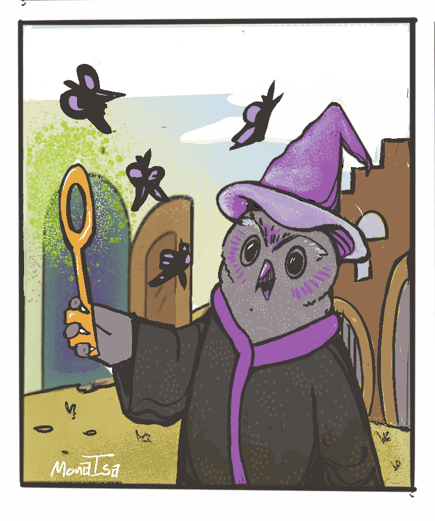
Lord Logout appears
Cackling echoes through a digital library. A dark figure coalesces.
The AuthOwl cries out
“Oh no, it's Lord Logout!”
The villain speaks:
“Too many logins! Too much confusion! The LMS is mine now! Mwa ha ha ha ha...”
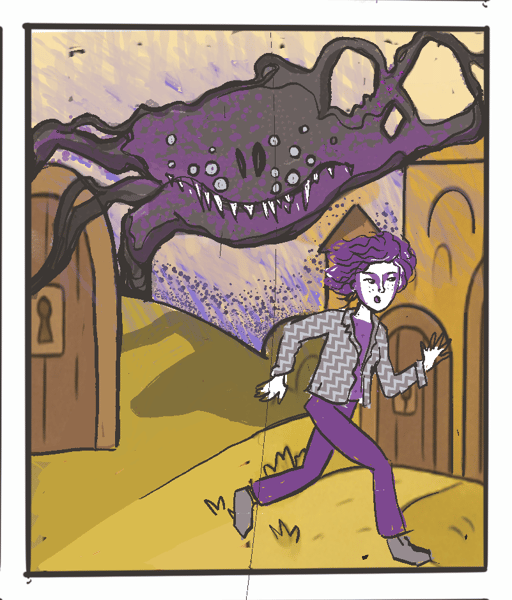
Lexie gets it now. This is the real villain nonprofits face, software choices made without a secure, well-built SSO in mind! Its always a bit of an afterthought, like a 'by the way' or generic paragraph in a software RFP.
But in truth, its one of the most important customer service decisions an association can make!
But most are stuck with:
- A website
- A learning platform
- A community space
- A donor portal
Each built at different times, by different vendors, with different assumptions, and custom methods. Ugh!
A broken world looks familiar
“Quick Lexie, login with your key!” AuthOwl screeches.
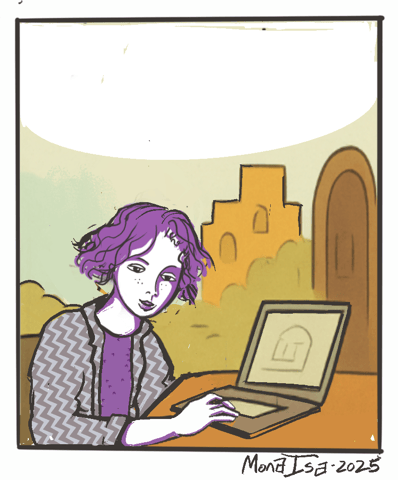
A laptop with a lock springs into existence. Lexie uses her key, and tests her access.
- The main website works.
- The learning system does not.
- The community forum rejects her.
She panics, then pauses.
“If one system works, my login must be right. So the problem isn’t me, its def something related to the SSO.” Lexie thinks outloud.
This is a critical SSO insight. When SSO fails, the issue is often:
- A broken connection between systems
- Mismatched identity data (they used the wrong email, etc.)
- A misconfigured integration (it works unless…)
There are many things that can happen, and without good information, its very disorienting!
Troubleshooting, nonprofit-style
Lexie realizes what’s wrong. Lord Logout didn’t destroy her identity. He broke the connections.
That’s how many real SSO issues behave:
- One app updated
- Another app expects old data
- The identity provider changed rules
- An attribute name no longer matches
- A login loop exists between systems.
She can see it now! When the connections are restored, she runs through an open door as Lord Logout fades away.
Lexie wakes up
Lexie jolts awake and runs to her desk. Her inbox is still full. Her systems are still complex.
But something has changed. She no longer thinks of SSO as “magic login stuff.” She sees it as a relationship between systems, with trust, handshakes, and clear responsibilities. And it should be built or re-built with consistency and really good documentation, and clear expectations with vendors.
Now she knows how to ask better questions and to help everyone at the association do the same.

What SSO really is (and is not)
SSO is when a central identity system authenticates you once and grants access to multiple independent applications.
It is not:
- A browser extension
- A VPN or something installed on a computer
- A shared password between many people
Like any good technology, it's a structured set of code and processes that are well-defined and meet specific needs and scope. It should act like a shell, protecting the users and helping them gain access wherever they go to access their member benefits. It makes general sense, like when Lexie works on her car, she can fix a lot of things, and other times, she might need a certified mechanic. It all comes down to the engine, right?

The “SSO shell” idea
In the ideal model, nonprofits put an SSO “shell” around, a consistent method so to speak, then it comes down to:
- The central identity layer
- The member records and data
- The login experience
This keeps the experience consistent even as systems change underneath. There are many methods out there, and even specialized vendors that help provide this as a Software-as-a-Service style product (with some development help). Auth0 and SAML for example are common methods used.
The key is to make sure there is as much standardization as possible, and that it's clearly communicated to potential new software vendors long before you sign a contract with them. It's about asking really good questions and putting the puzzle pieces together.

Questions Lexie now asks vendors
When evaluating or fixing SSO, Lexie no longer asks only “Does it support SSO?”
She asks:
- How do we add new authentication methods without breaking the user experience?
- Do you have a standardized, well-tested approach for integrating new apps?
- Where do SSO issues most commonly occur, and how are they diagnosed?
- How do you handle messy or duplicate identity data between systems?
- Can you provide references of customers who have worked with you on SSO successfully?
These questions surface potential issues and can help being 'shocked' when a system doesn't work via SSO like you thought it would.
Harrier take-away
No matter where you are at currently with your SSO, creating as much documentation and insight into how it works now will definitely help you improve it in the future. Make sure you have a technology partner or web developer who understands and can prove they have done SSO integrations in a consistent, comprehensive way. Then work with them to map out a phased plan to improve over time.